

























Ronda

Native iPhone app · iOS 16 and later

Every subscription.
No surprise charges.

Ronda keeps your subscriptions, bills and memberships in one place. See what is already paid this month and what is still to come, and get a heads-up days before a charge arrives.

Coming soon to theApp Store Coming soonSee how it works
  • Free to start
  • Premium is a one-time purchase
  • No account, no ads
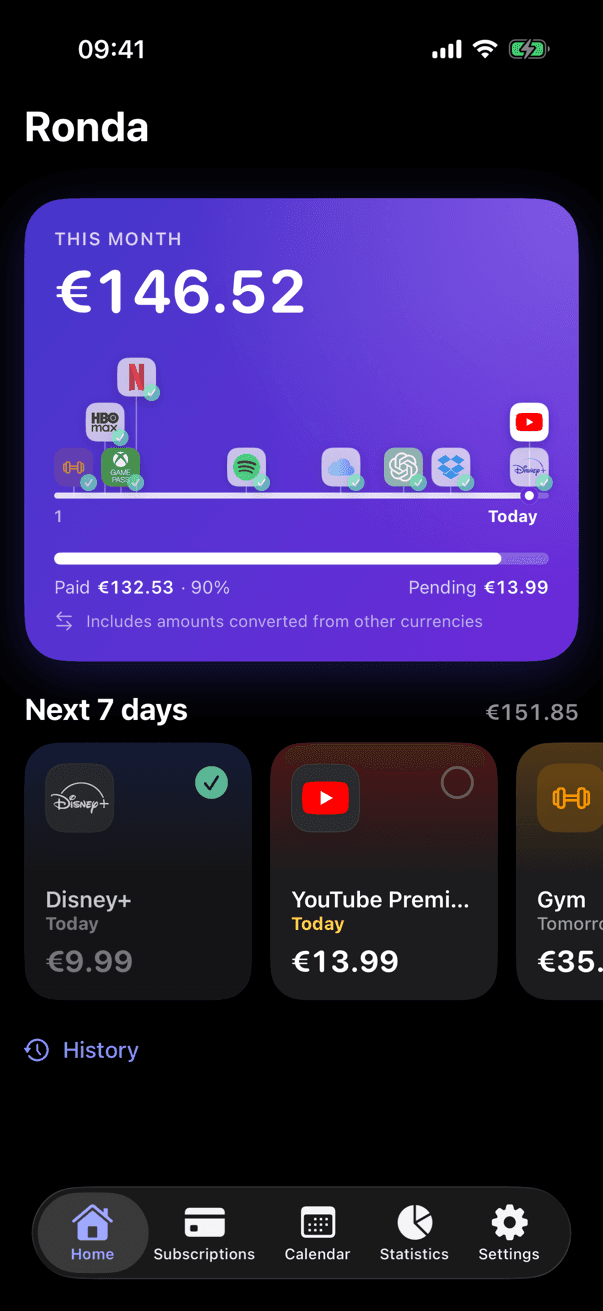
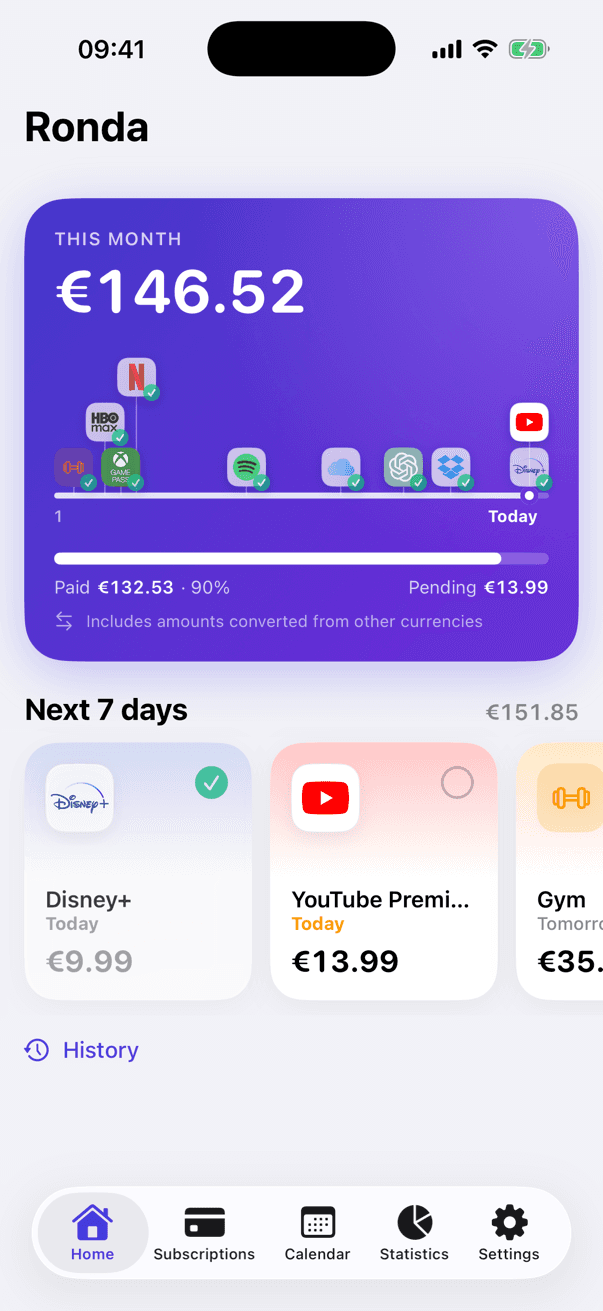
Ronda's home screen: this month's total with paid and pending amounts, and the charges of the next 7 days

More than 100 services with their logo. And anything else you pay for.

Type the name and Ronda adds the logo and the category, from Netflix and Spotify to ChatGPT or Duolingo. Not on the list? Add it anyway, with the name, amount and category you choose.

  • Netflix
  • Spotify
  • YouTube Premium
  • Disney+
  • HBO Max
  • Prime Video
  • ChatGPT
  • Dropbox
  • Notion
  • Xbox Game Pass
  • Duolingo
  • PlayStation Plus
  • Nintendo Switch Online
  • Crunchyroll
  • DAZN
  • Movistar Plus+
  • Filmin
  • Atresplayer
  • Audible
  • Adobe Creative Cloud
  • Canva
  • Figma
  • GitHub
  • 1Password
  • Microsoft 365
  • Google One
  • Strava
  • Twitch
  • TIDAL
  • Deezer
  • Claude
  • Perplexity
  • Uber One
  • Glovo Prime
  • Basic-Fit
  • El País
  • Paramount+
  • SkyShowtime
  • F1 TV
  • MasterClass
  • Headspace
  • Calm
  • Amazon Prime

Not on the list? Add it anyway

  • Rent
  • Gym
  • Health insurance
  • Language classes
  • Parking space
  • Anything you like

Your month at a glance

What you have paid, what is left and what is coming

The home screen adds up every charge of the month in your currency, pins each one to its day on a timeline and shows what is due in the next 7 days.

  • This month's total, split into paid and pending
  • Every charge on its day, with its logo
  • The next 7 days and any overdue payment, highlighted
  • Amounts in other currencies converted to yours

This month

€146.52

Paid €132.53 · 90%

Pending €13.99

Includes amounts converted from other currencies

How it works

Simple from the first minute

Real screens from the app, with the same demo data you would see on your iPhone.

1Add

Add them in seconds

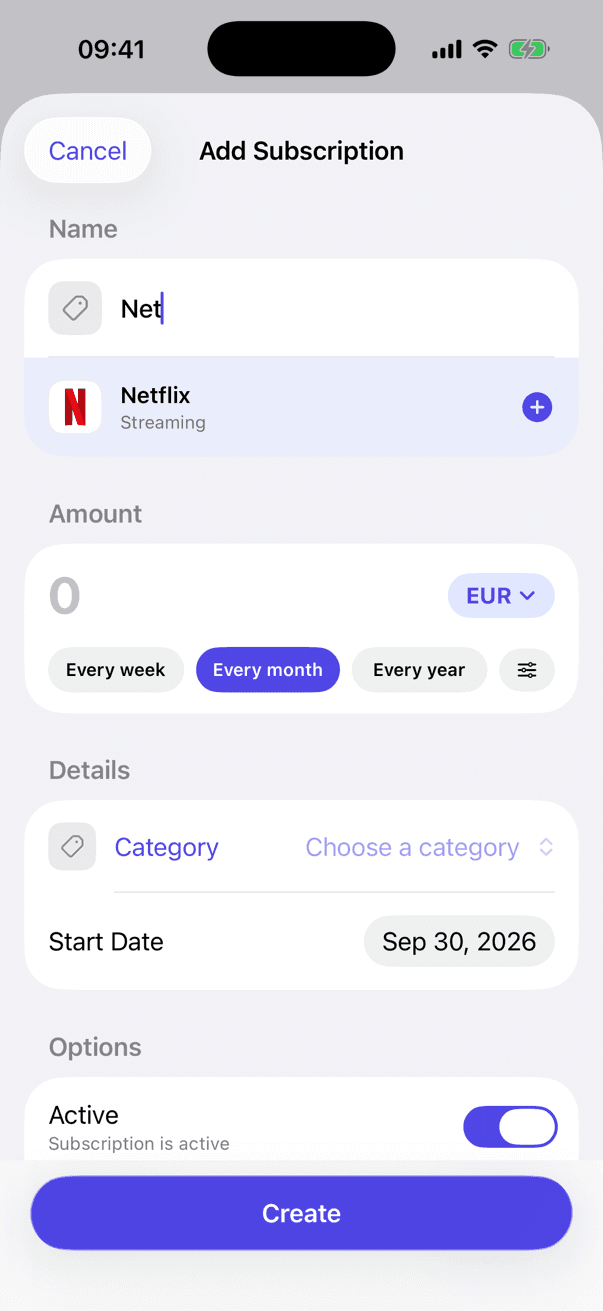
Type the name, pick the suggestion and enter the amount. Ronda recognises more than 100 services, shows their logo and files them in the right category. Is yours not there? Call it whatever you like and choose its category.

  • Any recurring payment: rent, gym, insurance…
  • Weekly, monthly, yearly or your own: every 2 weeks, every 3 months…
  • Each subscription in its own currency
New subscription form with the Netflix suggestion

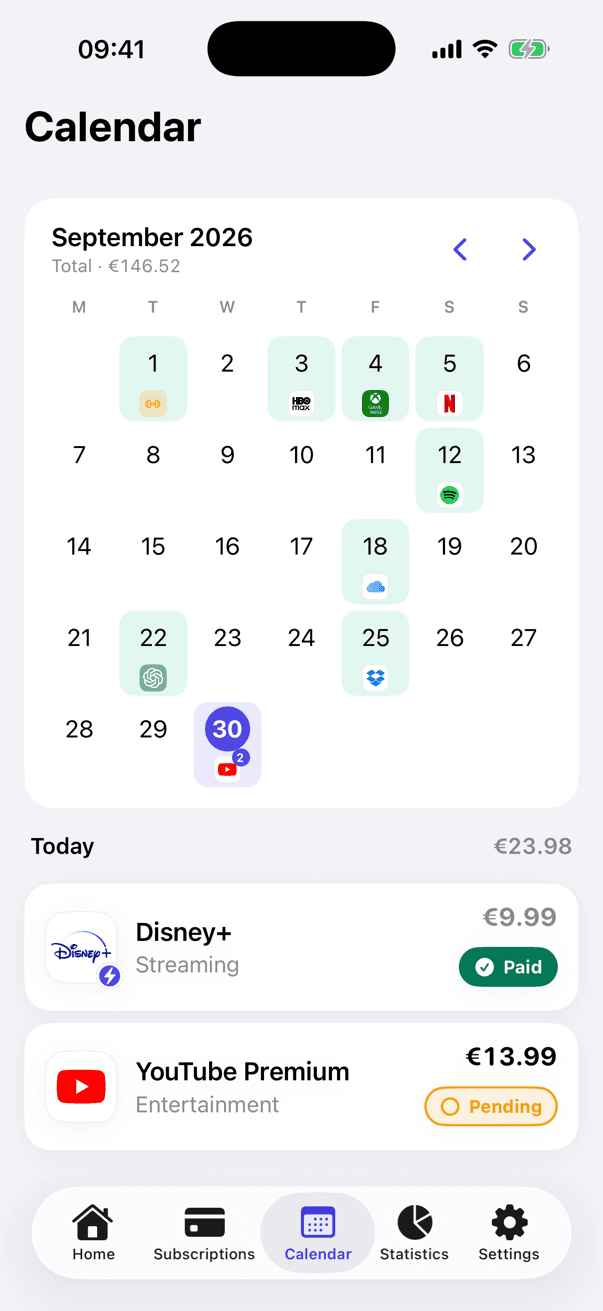
2Calendar

Every charge on its day

The calendar shows the logo of each charge on its day: green when it is paid, red when it is overdue and indigo when it is still to come. Tap a day to see what is due.

  • Monthly total at the top
  • Swipe between months
  • Days with several charges show a counter
Calendar of the month with the logo of each charge

3Paid or pending

Paid automatically, or by you

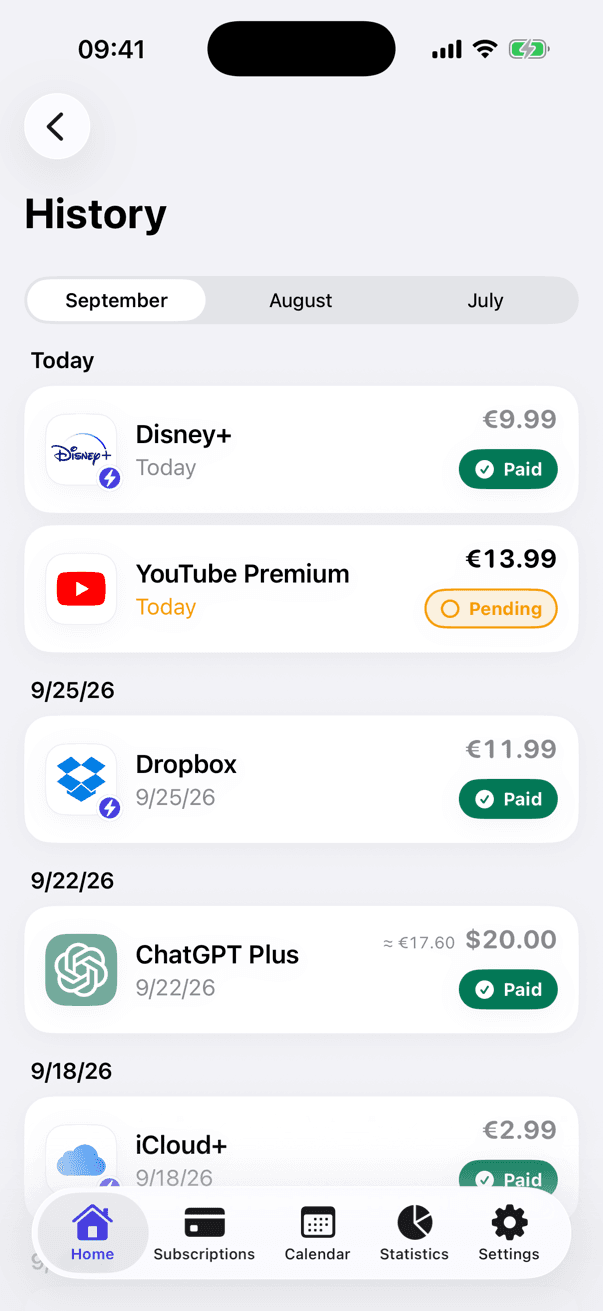
Turn on auto-pay and Ronda marks each charge as paid on its due date. Prefer to confirm it yourself? One tap. If a charge did not go through, untick it just as easily.

  • Auto-pay per subscription
  • History of the last three months
  • Overdue payments in red, so nothing slips
Payment history grouped by day with paid and pending charges

4StatisticsPremium

Find out what you really spend

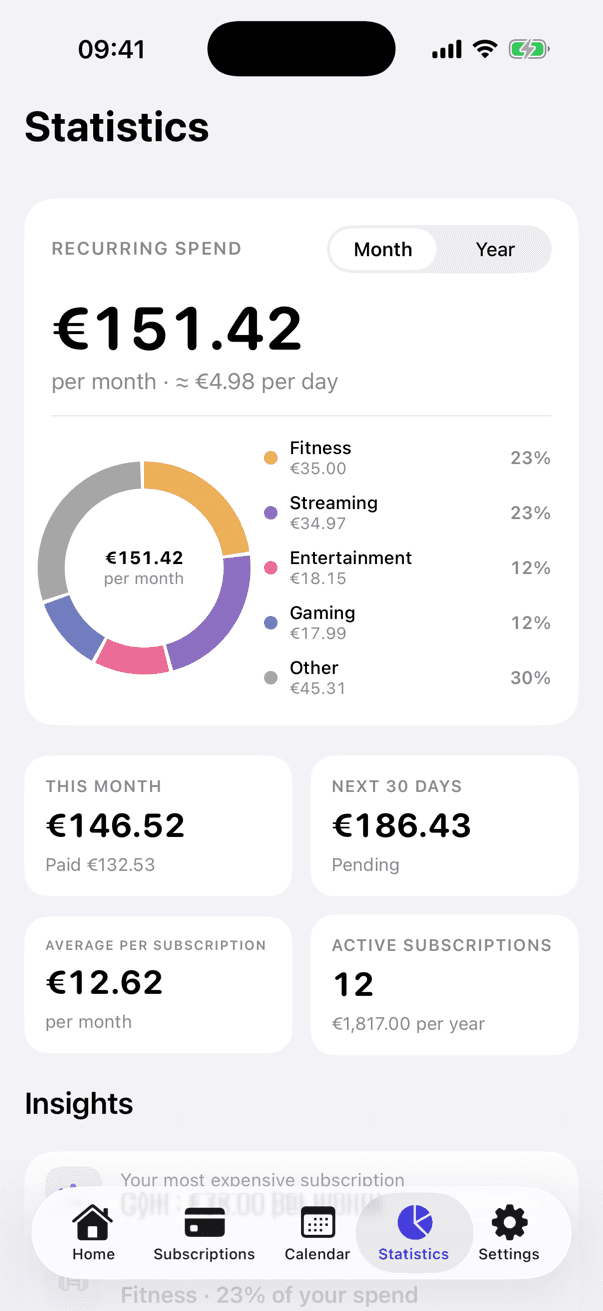
Monthly and yearly spend, the categories that weigh the most, your most expensive subscriptions and a forecast of the next six months.

  • Spend by category
  • Trend of the last six months
  • Plain-language insights
Statistics screen with recurring spend and a category chart

Reminders

Never miss a payment

Turn on reminders for the subscriptions you choose and decide how early, from 1 to 7 days before the charge. They arrive at 9:00 with the amount, so you have time to cancel or top up.

  • Per subscription, from 1 to 7 days ahead
  • Local notifications: scheduled on your iPhone, never on a server
  • One switch in Settings to pause them all

And much more

Thought through down to the last detail

  • 13 currencies, one total

    Each subscription keeps its currency. Totals and statistics are converted to yours with exchange rates refreshed once a day.

    €12.99

    $20.00

    £9.99

    ¥1,500

    R$39.90

    MX$149.00

    €12.99

    Your total

    €146.52

    EURUSDGBPMXNARSCOPCLPPENBRLJPYCHFCADAUD
  • Any frequency

    Weekly, monthly, yearly or custom.

    Every weekEvery monthEvery yearEvery 2 weeksEvery 3 monthsEvery 90 days
  • Auto-pay

    Charges are marked as paid on their due date.

    Netflix

    €13.99

    Pending Paid
  • Speaks your language

    English, Spanish, French, German, Italian, Portuguese, Russian, Japanese and Chinese (Simplified and Traditional), with local dates and amounts.

    HelloHolaBonjourHalloCiaoOláПриветこんにちは你好
  • 14 categories ready to use

    Streaming, music, gaming, cloud, fitness… With Premium, create your own with 108 icons and 18 colours.

    EntertainmentMusicStreamingGamingApps & SoftwareCloud / StorageHomeTransportHealth
  • Premium

    Dark mode

    Light, dark or following the system.

    Ronda's home screen in dark mode
  • Premium

    iCloud sync

    Your data in your private iCloud, up to date on every iPhone you use.

  • Truly native

    Built in SwiftUI, with Liquid Glass on iOS 26, haptics and VoiceOver labels.

Privacy

What you pay for is your business

Ronda has no accounts, no servers holding your data and no ads. Nobody, including us, can see what you pay for.

accounts
0
trackers
0
ads
0
  • No account

    Open the app and start. No sign-up, no email, no password.

  • On your iPhone

    Your subscriptions are stored on the device. With iCloud sync they go to your private iCloud, never to our servers.

  • No tracking

    No usage analytics, no advertising and no tracking SDKs. And no connection to your bank.

  • Local reminders

    Notifications are scheduled on the iPhone itself. Exchange rates are downloaded without sending anything about you.

Ronda Premium

A subscription app that isn't a subscription

What other apps charge you every month, you pay here only once. Premium unlocks everything, including the features still to come.

Pay once

Lifetime

Every premium feature, now and in the future, forever.

  • Unlimited subscriptions
  • Advanced statistics
  • iCloud sync
  • Custom categories
  • Dark mode
  • Future premium features

One-time payment · No automatic renewal

  • Secure payment with Apple
  • Restore on all your devices
  • No ads, ever
Coming soon to theApp Store Coming soon

The price is shown in your currency on the App Store and in the app before you buy.

Free vs Premium
—FreePremium
Subscriptions3∞
Payment reminders
Payment calendar
Advanced statistics–
Custom categories–
iCloud sync–
Dark mode–
Future premium features–

Frequently asked questions

Is Ronda free?

Yes. You can track up to 3 subscriptions with reminders, the calendar and the history without paying anything. Premium, a one-time purchase, removes the limit and adds statistics, iCloud sync, custom categories and dark mode.

Is Premium a subscription?

No. It is a single purchase through the App Store, with no renewals. If you get a new iPhone, restore it for free with your Apple Account.

Does Ronda connect to my bank?

No. You add your subscriptions yourself, in seconds thanks to the suggestions. Ronda never asks for banking details or accesses your accounts.

What if my service isn't one of the recognised ones?

You add it just the same. Type any name you like (your rent, the gym, an insurance policy), choose the category and the amount, and it works exactly like the rest: monthly total, calendar and reminders. The 100+ recognised services only add the logo and suggest the category.

Where is my data stored?

On your iPhone. If you have Premium and turn on sync, also in your private iCloud. There are no accounts and no servers of ours holding your data.

Can I use different currencies?

Yes. Each subscription has its own currency (13 are available) and totals are converted to your main currency with exchange rates refreshed once a day. Offline, the last downloaded rates are used.

How do reminders work?

You turn them on for each subscription and choose how many days ahead, from 1 to 7. They arrive at 9:00 as a local notification scheduled on your iPhone.

What do I need to use it?

An iPhone with iOS 16 or later. On iOS 26 it uses the new Liquid Glass design.

Which languages is it available in?

English, Spanish, French, German, Italian, Portuguese, Russian, Japanese, Simplified Chinese and Traditional Chinese. It follows your iPhone's language, and you can change it in Settings.

Take control of your subscriptions

Free to start. Premium is a one-time purchase.

Coming soon to theApp Store Coming soon